Plugins / Auto Category Images
 Free on WordPress.org
Auto Category Images for WooCommerce
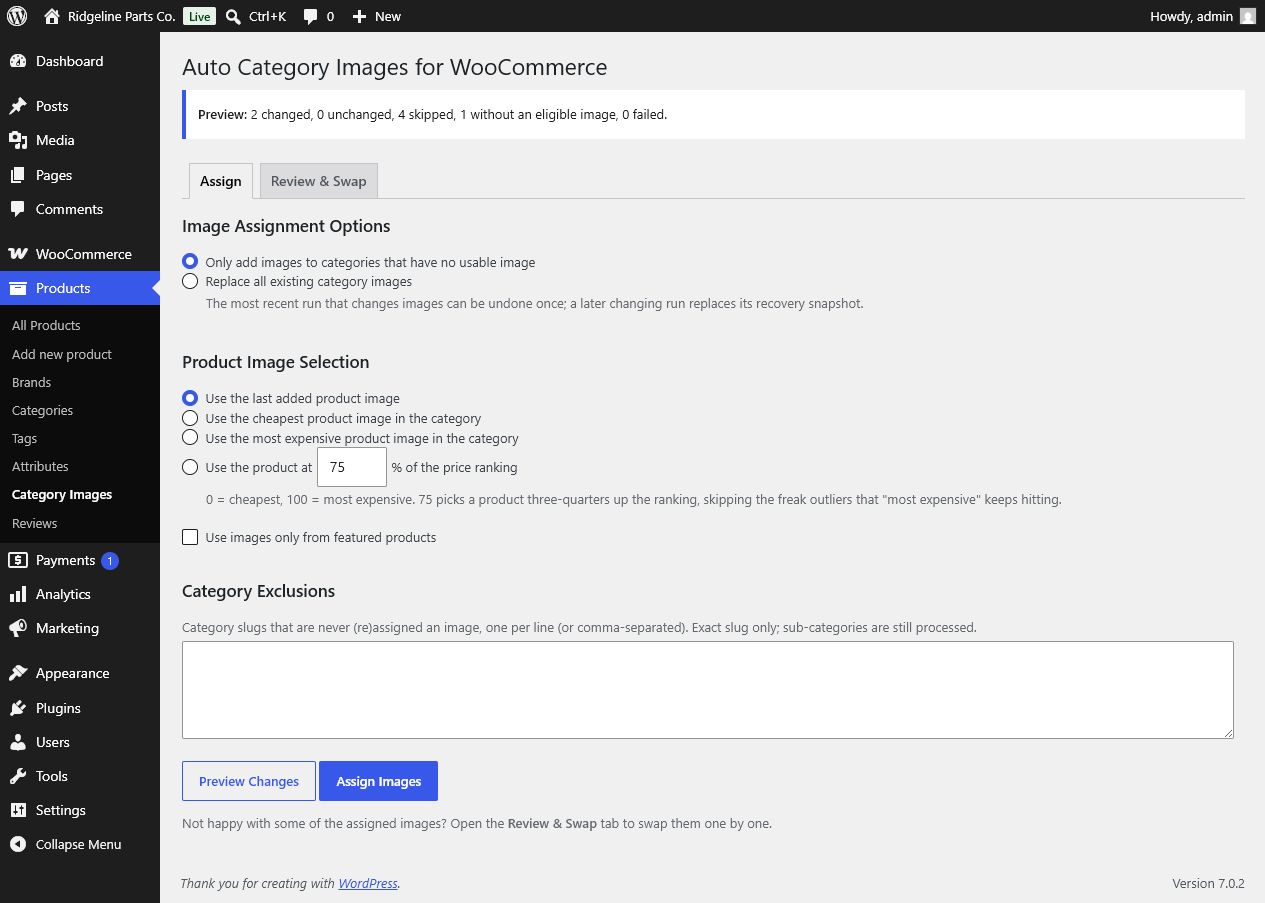
Every product category gets a real thumbnail, picked from the products inside it. One run covers the whole catalogue.
What it does
Big catalogues end up with hundreds of empty category thumbnails. Nobody has time to open each category and pick a photo by hand.
This plugin picks one for you. You choose the rule: the newest product, the cheapest, the most expensive, or a point on the price ladder. The default is 75% up the ladder, which looks good without landing on the one odd outlier, like a trailer in a category full of bolts.
You see a preview before anything is written. After a run you can undo it.
Who it is for
- Shops with dozens or hundreds of product categories.
- Shops where categories come from imports and nobody sets images by hand.
- Anyone who wants category pages that show what is inside them.
Screenshots
Features
- Four ways to pickLast added, cheapest, most expensive, or a percentile of the price ranking (default 75%).
- Preview before writingSee how many categories would change, stay the same, be skipped, or have no usable image.
- Only fill the gapsBy default it fills empty or broken thumbnails only. Replacing everything is a separate choice.
- Undo the last runOne snapshot restores exactly the thumbnails that run replaced, empty ones included. It is saved before the first change, so a run cut off by a timeout can still be undone.
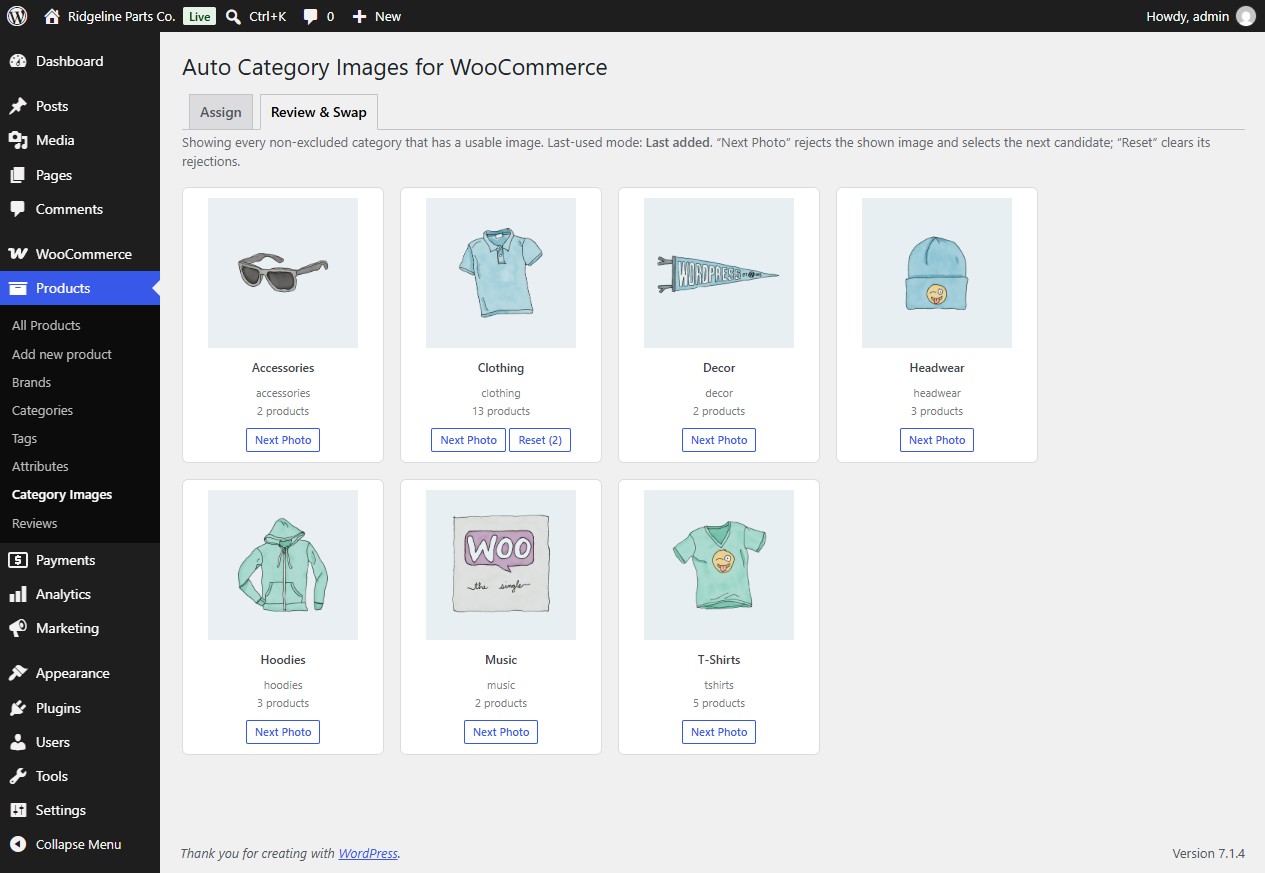
- Review & SwapClick Next Photo to reject an image. Rejections are remembered, so a new run never brings it back.
- Exclusions and featured-onlySkip categories by slug, or pick only from featured products.
- Fast on large cataloguesPrice ranking uses WooCommerce's indexed lookup table instead of sorting by post meta.
- Clean uninstallSettings, rejections and the snapshot are removed. Your category thumbnails stay.
Developer hooks
Added in version 1.2.0. All hooks use the farstripes_aci_ prefix.
farstripes_aci_candidate_idsFilter. The ranked product IDs for one category, best first. Arguments: IDs, term ID, selection mode.farstripes_aci_selected_imageFilter. The image chosen for a category by a run or a Review reset; return 0 for none. Arguments: attachment ID, term ID, selection mode.farstripes_aci_skip_categoryFilter. Return true to leave a category untouched by runs and previews. Arguments: skip flag, term, settings.farstripes_aci_before_assignAction. Fires before a run starts choosing images, not on a preview. Argument: settings.farstripes_aci_after_assignAction. Fires after a run has written its changes, for example to purge a page cache. Arguments: run report, settings.farstripes_aci_after_undoAction. Fires after an undo. Argument: undo report.
Questions
Does it overwrite category images I set by hand?
Not unless you tell it to. The default only fills categories without an image. Switch to Replace all if you want every category done.
How does the percentile mode work?
Products in a category are ranked by price, cheapest first. 75 picks the product three quarters of the way up. 0 is the same as cheapest, 100 the same as most expensive.
Is it safe on a large catalogue?
The expensive part, ranking by price, uses WooCommerce's indexed lookup table. A full run still depends on how many categories you have and your host's request limit, so preview first and keep a backup on very large stores.
Can I undo a run?
Yes. After a run changes images, the Assign tab shows Undo Last Assignment. It restores the thumbnails from before that run. There is one snapshot; the next run that changes images replaces it. The snapshot is saved before the first image changes, so a run cut off by a timeout or an error can still be undone.
What happens when I uninstall it?
Settings, rejections and the snapshot are removed. The thumbnails stay, because they are normal WooCommerce category data.
Where do I get help?
On the plugin's WordPress.org support forum. See Support.
Version 1.2.0. Requires WordPress 6.2, PHP 7.4 and WooCommerce. Tested up to WordPress 7.1. GPLv2 or later.