Plugins / Restock Alerts
 Free on WordPress.org
Farstripes Restock Alerts for WooCommerce
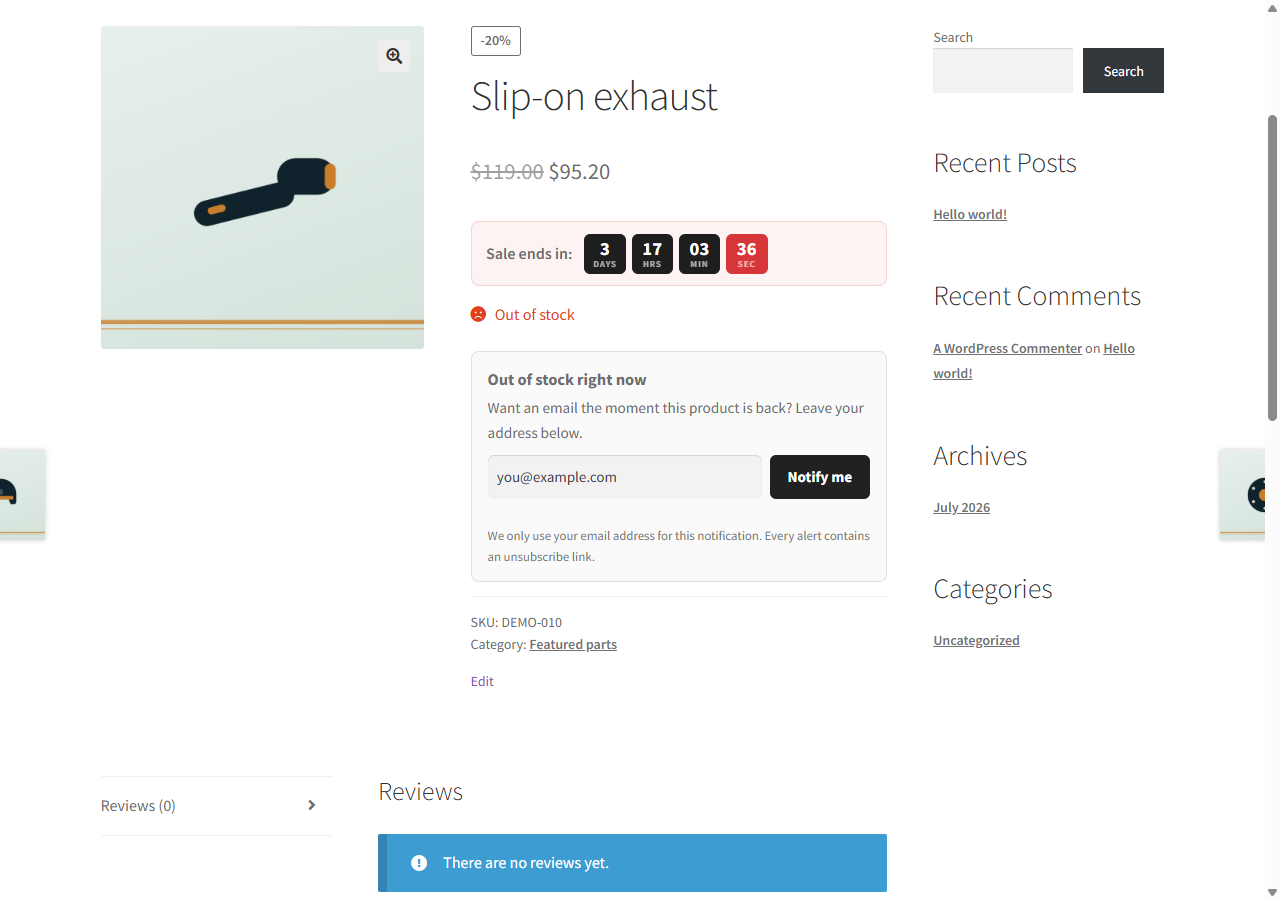
Visitors leave their email on a sold-out product or variation. When it is back, they get one email with a buy link. Including when your import tool restocked it.
What it does
Most back-in-stock plugins listen to one WooCommerce hook. That hook fires when you edit stock in the admin. It does not fire when a feed or import tool writes stock straight to the database, so subscribers never hear about the restock.
This plugin uses that hook too, and adds an hourly check. It compares every product that has subscribers with its current stock status. If an import quietly put a product back in stock, the alert goes out within the hour. Each product is checked again through WooCommerce before any email is sent.
We built it for a shop where the whole catalogue is updated by supplier feeds.
Who it is for
- Shops that update stock with imports or supplier feeds.
- Shops that sell out often and lose those visitors.
- Shops that want double opt-in and no outside email service.
Screenshots
Features
- Two triggersThe WooCommerce stock hook for instant alerts, plus an hourly check that catches import restocks.
- One email per restockEach subscription is claimed before its email is sent, so nobody gets two emails if both triggers fire at once.
- Failed emails are retriedIf your mail server refuses an alert, the subscription stays and the hourly check tries again, up to three attempts.
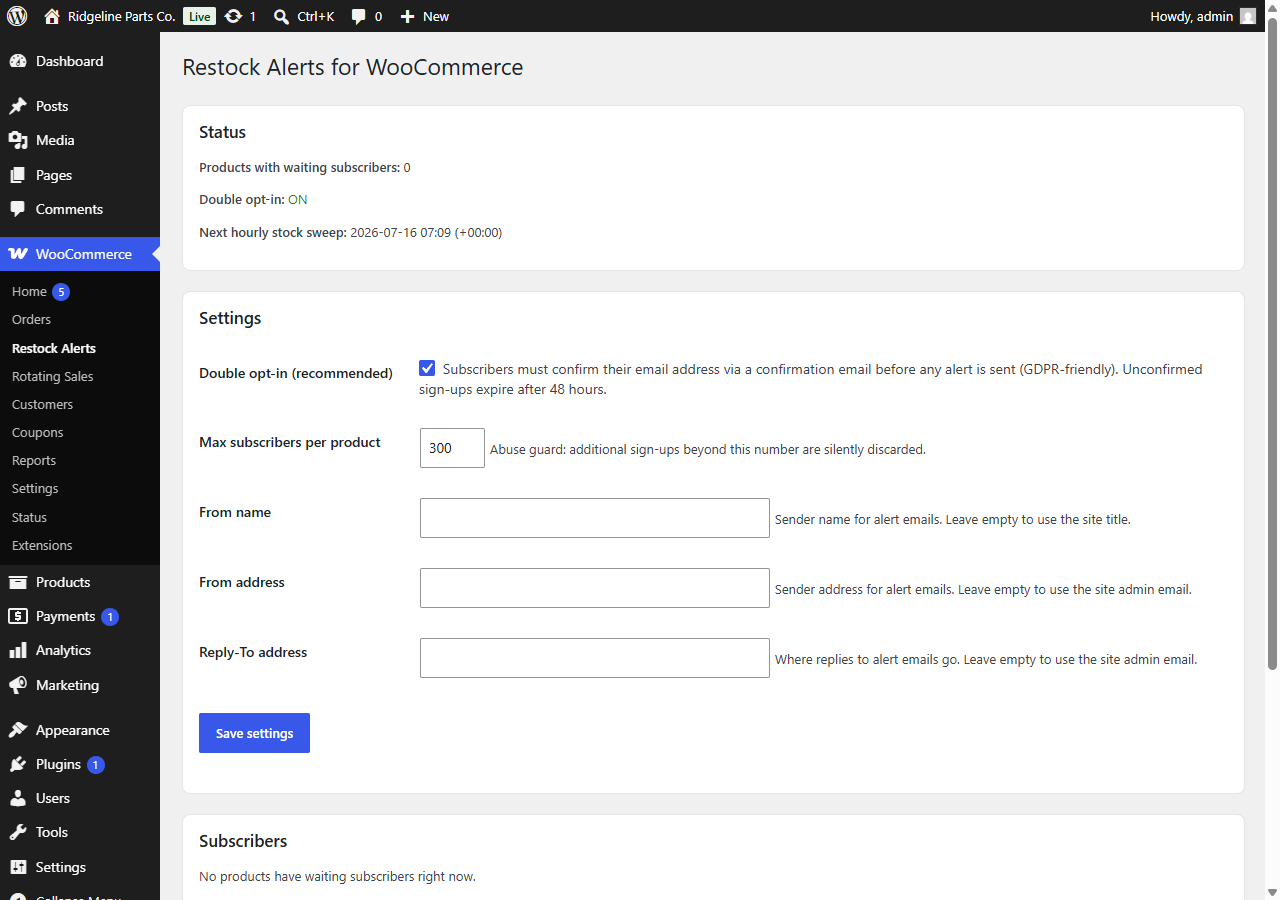
- Double opt-in, on by defaultSubscribers confirm with one click. Unconfirmed sign-ups expire after 48 hours. You can switch it off.
- Your store's email templateAlerts use your WooCommerce email look. Sender name, from address and reply-to are yours to set.
- Simple and variable productsOn a variable product the form appears when the shopper picks a sold-out size or colour, and the alert is for that variation.
- One-click unsubscribeEvery alert has a link that removes the address from all products at once.
- GDPR erase and CSV exportFind an address and delete it everywhere, or export all confirmed subscribers.
- Bot protectionA honeypot field and a per-product cap on subscribers (300 by default).
- No outside servicesGuests subscribe without an account. All data stays in your own database. The form works without JavaScript.
Developer hooks
Added in version 1.1.0. Call the functions after plugins_loaded.
rsal_subscribe()Function. Subscribe an address to a simple product or variation. Arguments: product ID, email, options (confirmed: true skips double opt-in, false forces it, null follows the setting). Returns pending, confirmed or aWP_Error.rsal_unsubscribe()Function. Remove an address from one product, or from all products with product ID 0. Returns the number of rows removed.rsal_is_subscribed()Function. Whether an address is on a product's list. Arguments: product ID, email, confirmed only.rsal_subscribedAction. A subscription was stored (pending) or became active (confirmed). Arguments: product ID, email, status.rsal_unsubscribedAction. An address was removed from a product, by the unsubscribe link, the admin erase orrsal_unsubscribe(). Arguments: product ID, email.rsal_alert_sentAction. A back-in-stock email was accepted bywp_mail(). Arguments: product ID, email, product.rsal_product_eligibleFilter. Whether a product or variation may get the form. Default: simple products and variations. Arguments: eligible, product.rsal_email_subjectFilter. The mail subject. Arguments: subject, type (confirmation or alert), product, email.rsal_email_bodyFilter. The inner HTML body, before the WooCommerce email header and footer are added. Arguments: body, type, product, email.rsal_email_headersFilter. The mail headers (Content-Type, From, Reply-To). Arguments: headers, type, product, email.
Questions
What is double opt-in, and can I turn it off?
A new subscriber first gets a confirmation email. Only confirmed addresses get alerts, and unconfirmed sign-ups expire after 48 hours. That is the safe setup under EU privacy rules. You can switch it off under WooCommerce, Restock Alerts.
Does it work with WP All Import or feed tools?
Yes, that is the reason it exists. The hourly check reads WooCommerce's product lookup table, which WooCommerce and mainstream import tools keep in sync, and re-checks each product before sending.
Does it work with variable products?
Yes. The form stays hidden until the shopper picks a variation that is out of stock, and the alert is for that variation only. If your store hides out-of-stock items, those variations cannot be picked, so no form shows.
What if an alert email fails to send?
The subscription is kept and the next hourly check tries again, up to three attempts. After the third failure the address is dropped. If many alerts fail, check your site's mail setup; an SMTP plugin usually fixes it.
Can I change the email text?
Yes, with the rsal_email_subject and rsal_email_body filters, or by translating the plugin's texts with any translation plugin.
Do customers need an account?
No. An email address is enough.
Where is subscriber data stored?
On the product itself, in your own WordPress database. No external service, no API keys.
What happens when I deactivate or delete it?
Deactivating stops the form, the emails and the hourly check, but keeps subscribers. Deleting removes settings, the scheduled check and all subscriber data.
Where do I get help?
On the plugin's WordPress.org support forum. See Support.
Version 1.1.0. Requires WordPress 6.2, PHP 7.4 and WooCommerce. Tested up to WordPress 7.1. GPLv2 or later.