Plugins / Omnibus & Unit Price
 Free on WordPress.org
Omnibus & Unit Price for WooCommerce
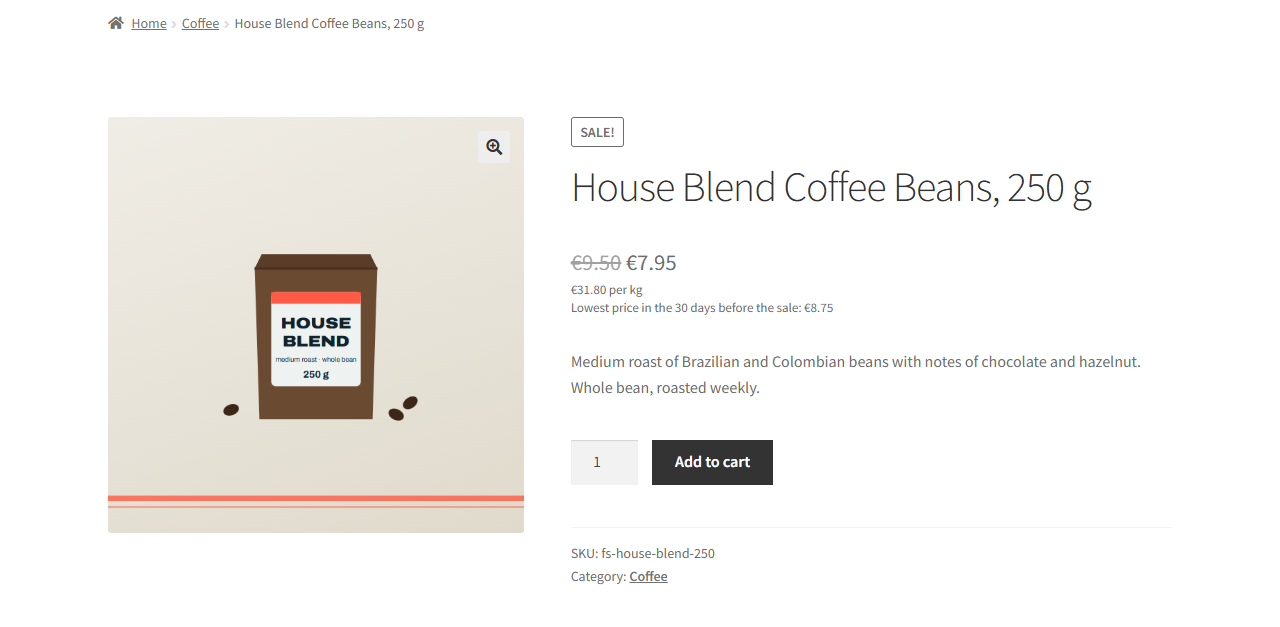
Next to a discount, the lowest price of the 30 days before the sale started. Next to the price, the price per kilo, litre, metre or piece. Two EU price rules in one small plugin.
What it does
In the EU, a shop that announces a price reduction has to show the lowest price it charged in the 30 days before the reduction. That rule comes from the Omnibus directive. Goods sold by weight, volume, length or area also need a unit price next to the selling price. WooCommerce does neither out of the box.
This plugin records every price change of your products and variations. When a product goes on sale, it shows a line such as Lowest price in the 30 days before the sale, with that price. It looks at the 30 days before the current sale started, not the 30 days up to today. Measured up to today, the sale price would become its own lowest price.
For the unit price you enter the contents of a product, for example 500 ml. The plugin then shows the price per litre under the price, following the sale price and your tax setting.
Who it is for
- Shops that sell to consumers in the EU and run discounts.
- Shops that sell by weight, volume or length: food, drinks, pet food, paint, cable.
- Shop owners who want both rules in one plugin with one settings tab.
How it works
It records prices
On activation it stores the current price of every product in the background. From then on it records every change of the regular and the actual price: product saves, quick and bulk edit, imports that use WooCommerce or WordPress functions, and WooCommerce's own scheduled sales.
It works out the lowest price when a price changes
The result is stored with the product. Showing a page adds no queries on the price history.
It cleans up after itself
A daily cleanup keeps only what the calculation needs: per product, the changes in the current window plus the one price in force at its start. The history stays small.
Screenshots
Features
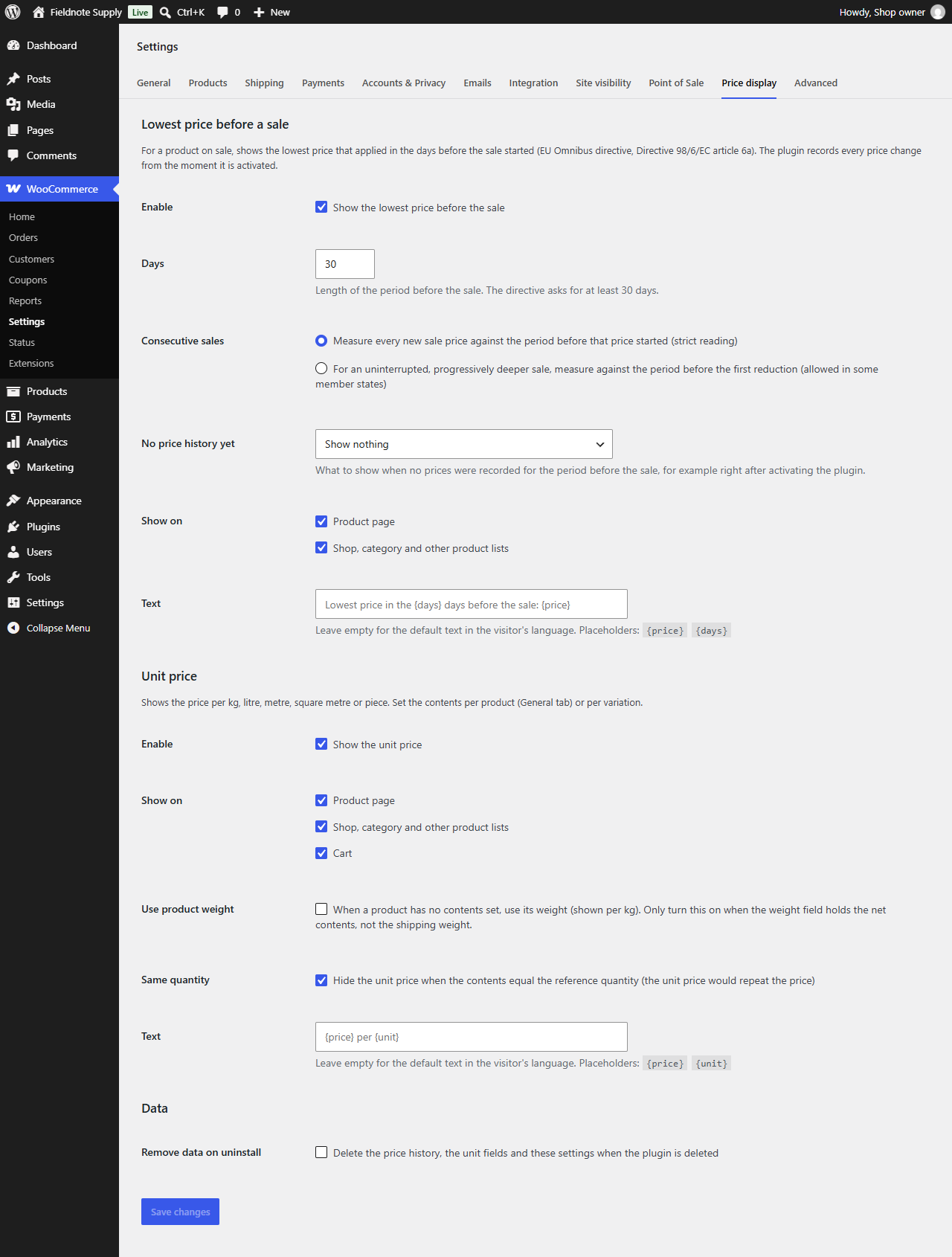
- Measured before the saleThe lowest price of the 30 days before the current sale started. You can set more days; 30 is the minimum the directive sets.
- Simple and variable productsA variable product shows the lowest price of its variations on sale, as a range when they differ. Each variation shows its own value when picked.
- Scheduled and consecutive salesA scheduled sale counts from the moment WooCommerce applies it. A second, deeper sale is measured against the period before it, so the first sale price counts. Where your country allows it for progressive reductions, you can measure against the period before the first reduction instead.
- Your choice without historyFor a product with no recorded price before its sale, show nothing or show the regular price.
- Your tax settingPrices follow your choice to show them including or excluding tax.
- Contents per product or variationFor example 500 ml. A variation can have its own contents or use the parent's. Optionally set the reference, such as per 100 g instead of per kg.
- Common unitsmg, g, kg, ml, cl, l, m³, mm, cm, m, cm², m² and piece. Developers can add more.
- Where it showsProduct page, shop and category lists, and the classic cart, each switchable. Optionally uses the product weight when no contents are set, and hides when the contents equal the reference, like a 1 kg bag shown per kg.
- Your own wordingEvery text is a template you can change, or leave empty for the translated default. Dutch and German translations included.
- Plain and privateOne settings tab. HPOS compatible. No outside requests, no tracking, no ads, no upsell.
What it does not do
- It is not legal advice. It helps you show the lowest prior price and the unit price. Whether your shop meets the rules also depends on how you run your sales, what you sell and how your country applies the directives. When in doubt, ask a lawyer or your consumer authority.
- It does not know prices from before you installed it. A product that was already on sale at activation, or was created with a sale price, has no recorded price from before its sale. A period longer than 30 days only works for the time the plugin has been recording.
- The unit price does not show in the cart and checkout blocks. Those blocks do not use WooCommerce's classic price output, so they show the normal price only. The classic cart shows it.
- It does not fill in contents for you. You enter them per product or variation, or a developer supplies them with the
oupwc_unit_datafilter, for example parsed from the product title. - It does not change prices, orders or coupons. It records product prices and adds two lines to the price display.
- It is built for classic themes. It is tested with Storefront.
Developer hooks
Stable from version 1.0.0. Output is wrapped in span.oupwc-lowest-price and span.oupwc-unit-price for styling.
oupwc_templateFilter. A display template before its placeholders are filled. Arguments: template, key (omnibuswith{price}and{days}, orunitwith{price}and{unit}).oupwc_lowest_priceFilter. The lowest prior price of a product or variation on sale, tax as entered; null means no history. Arguments: price, product ID.oupwc_unit_dataFilter. The contents and reference of a product or variation. Return your own to supply contents from elsewhere; null shows no unit price. Arguments: data, product ID.oupwc_unitsFilter. The list of units. Add a unit with its family (mass, volume, length, area or count), a factor to the family's base unit, and a label.oupwc_showFilter. Whether the lowest price or the unit price shows for a product on the product page, in a list or in the cart. Arguments: show, part, context, product.oupwc_price_recordedAction. A price change was written to the history. Arguments: product ID, regular and actual price, time.oupwc_get_lowest_price()Function. The lowest prior price of a product, or null.oupwc_get_unit_price()Function. The unit price of a product with its reference unit, or null.
Example: add_filter( 'oupwc_template', function( $template, $key ) { return 'omnibus' === $key ? 'Lowest price in the last {days} days: {price}' : $template; }, 10, 2 );
Questions
Does this make my shop legally compliant?
No plugin can promise that. This one displays the lowest prior price and the unit price. Whether your shop meets the rules also depends on how you run your sales, what you sell and your national law. It is not legal advice.
Why does a product on sale show no lowest price?
The plugin knows prices from the moment it was activated. A product that was already on sale then, or that was created with a sale price, has no recorded price from before its sale. Under No price history yet you choose whether to show nothing or the regular price.
Which price counts when I run one sale after another?
By default each new sale price is compared with the lowest price of the 30 days before that price started, so the earlier sale price counts. If your country allows it for progressively increasing reductions, choose to measure against the period before the first reduction.
Can I change the 30 days?
Yes, under Days. The directive sets 30 days as the minimum. A longer period only works for the time the plugin has been recording.
How big does the price history get?
Small. One row per price change, and the daily cleanup deletes rows the calculation no longer needs.
Does it touch orders or coupons?
No. It records product prices only and never changes a price, an order or a coupon.
What happens when I uninstall it?
Its timers are removed. The price history and the contents fields are deleted only if you tick Remove data on uninstall.
Where do I get help?
On the plugin's WordPress.org support forum. See Support.
Version 1.0.0. Requires WordPress 6.5, PHP 7.4 and WooCommerce 8.0. Tested up to WordPress 7.1. GPLv2 or later.